
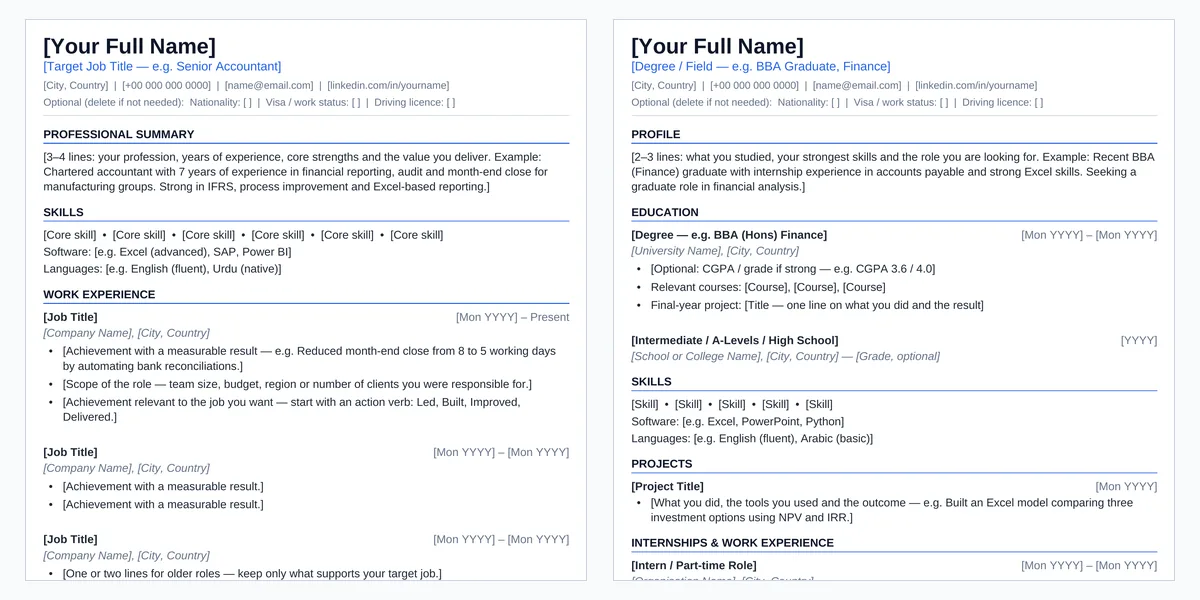
Professional CV
For experienced professionals. Summary, skills and achievement-focused work experience first.
Download Professional CVGraduate / Student CV
For students, fresh graduates, interns and anyone with limited experience. Education and projects first.
Download Graduate / Student CVEditable in Microsoft Word 2007 or later and Microsoft 365. General guidance only, not career or legal advice.
What’s inside each template
| Professional CV | Graduate / Student CV |
|---|---|
| Header with target job title and contact line | Header with degree or field and contact line |
| Professional Summary · Skills (software and languages) | Profile · Education (grade, courses, final-year project) |
| Work Experience — three role blocks with result-focused bullets | Skills · Projects · Internships & Work Experience |
| Education · Certifications · Additional Information | Activities & Volunteering · Certifications · Awards |
Both include an optional line for nationality, visa or work status and driving licence, and a one-page guide with writing tips and country notes. You delete the guide page before sending.
How to use it
- Choose your version. Professional if you have relevant work experience; Graduate / Student if education and projects are your strongest material.
- Replace the placeholders. Every item to change is in [square brackets]. Press Ctrl+F and search for “[” to make sure none remain.
- Tailor and trim. Match your summary and skills to the job advert, and delete sections that do not apply.
- Save as PDF. Unless the employer asks for Word, send a PDF named like Firstname-Lastname-CV.pdf.
Write achievements, not duties
Weak
Responsible for bank reconciliations.
Stronger
Reduced month-end close from 8 to 5 working days by automating bank reconciliations in Excel.
Start with an action verb, say what changed, and use numbers only where they are honest and you can explain them in an interview.
Designed with ATS parsing in mind
- Normal, selectable Word text in one column — no tables, text boxes, columns, icons or images.
- Standard section names such as Work Experience, Education and Skills.
- One consistent date format, aligned with a tab rather than a table.
- A standard font and a clear reading order from top to bottom.
Applicant tracking systems differ, and no template can guarantee how every system reads a file. A simple, conventional structure like this gives yours the best chance of being read correctly.
Country guidance
UAE / GCC
Nationality, visa or work status and driving licence are often expected — use the optional line. If a photo is requested, send it separately and keep the ATS version text-only.
Pakistan
A4, with education, experience, skills and certifications clearly visible. Photo and personal details are optional — add them only if the employer asks.
UK
No photo, date of birth, marital status or other unnecessary personal details — delete the optional line. Mention right to work only if relevant, and focus on achievements.
Frequently asked questions
Which version should I use?
Use the Professional CV if you have relevant work experience to show. Use the Graduate / Student CV if you are studying, recently graduated or applying for an internship, so your education and projects come first.
What does ATS-friendly mean?
Many employers use applicant tracking systems to store and search CVs. An ATS-friendly CV uses plain text, standard headings and a simple one-column layout so the software can read it in the right order. It improves the chances of being read correctly, but no template can guarantee it.
Should I add a photo to my CV?
It depends on the country. In the UK, leave it out. In the UAE, GCC and Pakistan a photo is optional and sometimes requested — send it only when asked, and keep this text-only version for online applications.
How long should my CV be?
One page for students and graduates and for most people with under ten years of experience; two pages at most for longer careers.
Can I edit it in Google Docs?
The templates are designed and tested for Microsoft Word. They can be opened in other word processors, but some formatting may look slightly different.
More free career templates
These templates are general guidance, not career, immigration or legal advice. Hiring practices vary by employer and country — always follow the instructions in the job advert. Found an error? Email support@babadigit.com.