
 Download the Debt Payoff Planner (.xlsx)
Designed and tested for Microsoft Excel. Opens with clearly labelled sample data you can clear. General information only, not financial advice.
What’s inside
- Debts — up to 8 debts with balance, yearly interest rate (APR) and minimum payment, plus the total you can pay towards debts each month.
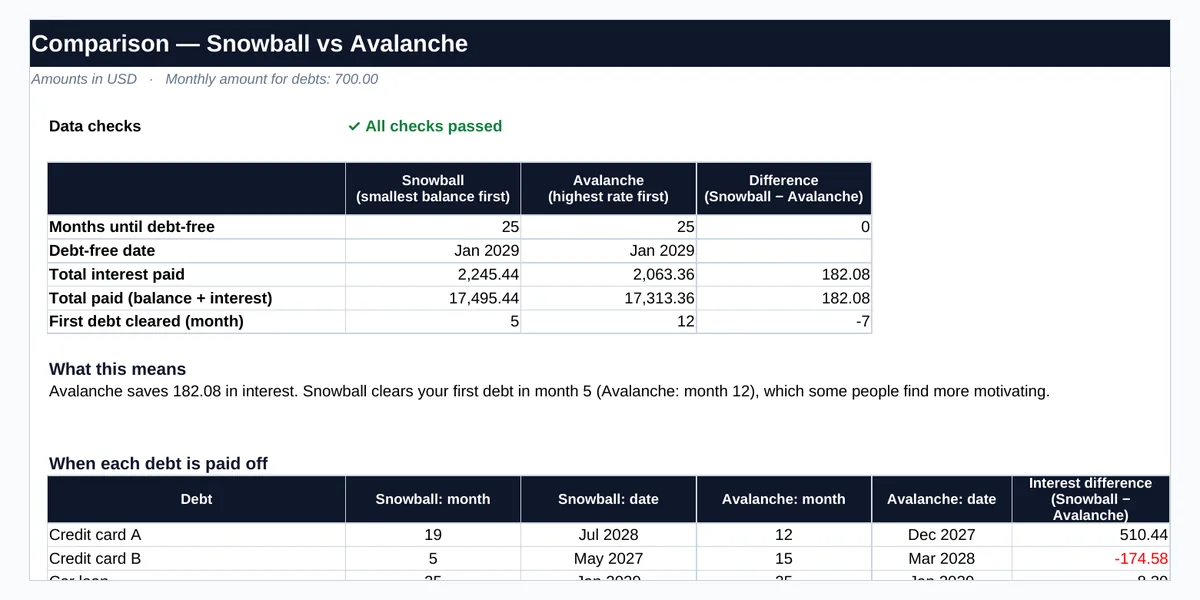
- Comparison — months to debt-free, debt-free date, total interest, total paid and when the first debt is cleared, for both methods, plus the payoff date of each debt and a plain-English summary.
- Snowball and Avalanche schedules — month-by-month interest, payments and balances for up to 20 years.
- Checks — 13 checks, including whether your monthly amount covers every minimum payment.
Snowball or Avalanche?
Snowball — pay minimums on everything and put every spare amount on the smallest balance first. You clear individual debts sooner, which many people find motivating.
Avalanche — pay minimums on everything and put every spare amount on the highest interest rate first. This usually costs less interest overall.
Neither is right for everyone. In both, the payment from a cleared debt rolls on to the next one. The planner shows the trade-off for your own debts so you can choose based on what matters more to you: lower total cost, or quicker early wins.
How to use it
- List your debts. Take the balance, APR and minimum payment from your latest statements.
- Set your monthly amount. Enter the total you can pay towards all debts each month — at least the sum of the minimums.
- Compare the methods. Check the debt-free date, total interest and when each debt is cleared.
- Pick and follow a plan. Revisit it when balances, rates or your monthly amount change.
Example
Four sample debts (two credit cards, a car loan and a personal loan) and 700.00 a month towards them:
Avalanche: 2,063.36 interest · debt-free Jan 2029
Snowball: 2,245.44 interest · debt-free Jan 2029
First debt cleared: Snowball month 5 · Avalanche month 12
Here Avalanche saves 182.08 in interest, while Snowball clears the first debt seven months sooner.
Frequently asked questions
Which method saves the most money?
Avalanche usually costs the least interest because it targets the highest rate first. Snowball can still be the better choice if early wins help you stick to the plan. The planner shows the difference for your own debts.
What if my monthly amount does not cover the minimum payments?
The Checks sheet flags it and the comparison is not meaningful until it does. Contact your lenders if you cannot meet minimum payments.
How is this different from the Loan / EMI Calculator?
The Loan / EMI Calculator works out the payment and schedule for a single loan. This planner handles several debts at once and decides the order in which to pay them off.
Are the results exact?
They are estimates. The planner adds interest monthly (APR ÷ 12). Lenders may calculate interest daily, charge fees or change rates, so use your statements for exact figures.
Does it work in Google Sheets?
The workbook is designed and tested primarily for Microsoft Excel. It can be opened in other spreadsheet applications, but some features may behave differently.
Related free resources
This workbook is a planning tool, not financial or debt advice. If you are struggling with debt, consider speaking to a qualified, independent adviser. Written and reviewed by Ghayas Uddin, MS (Finance), financial analyst. Last reviewed 5 October 2026. Found an error? Email support@babadigit.com.