
People are the largest cost in most businesses, and the hardest to budget: hires start mid-month, people leave, pay rises land in April, and payroll taxes, pension and benefits add a large amount on top of salary. A single annual figure hides all of that.
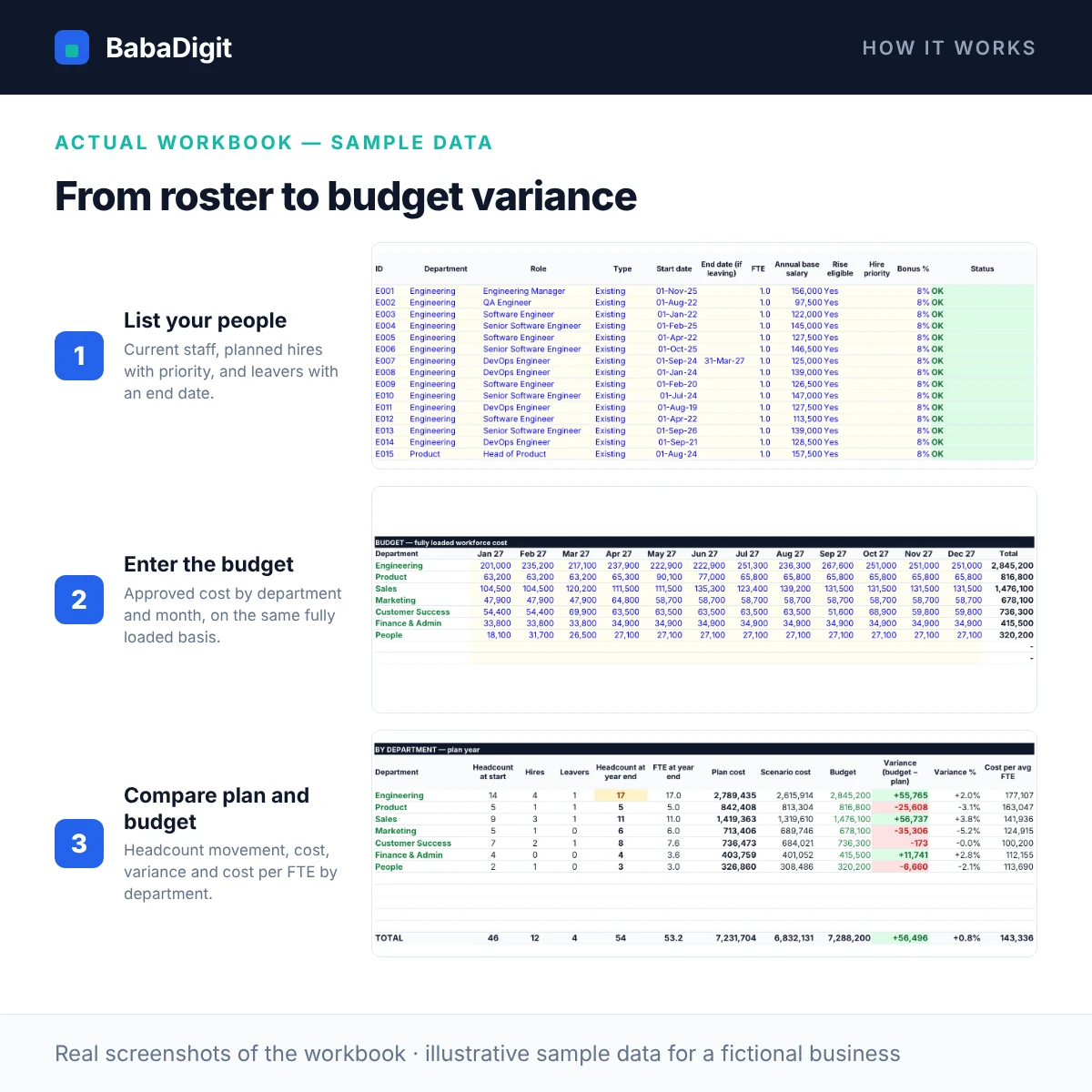
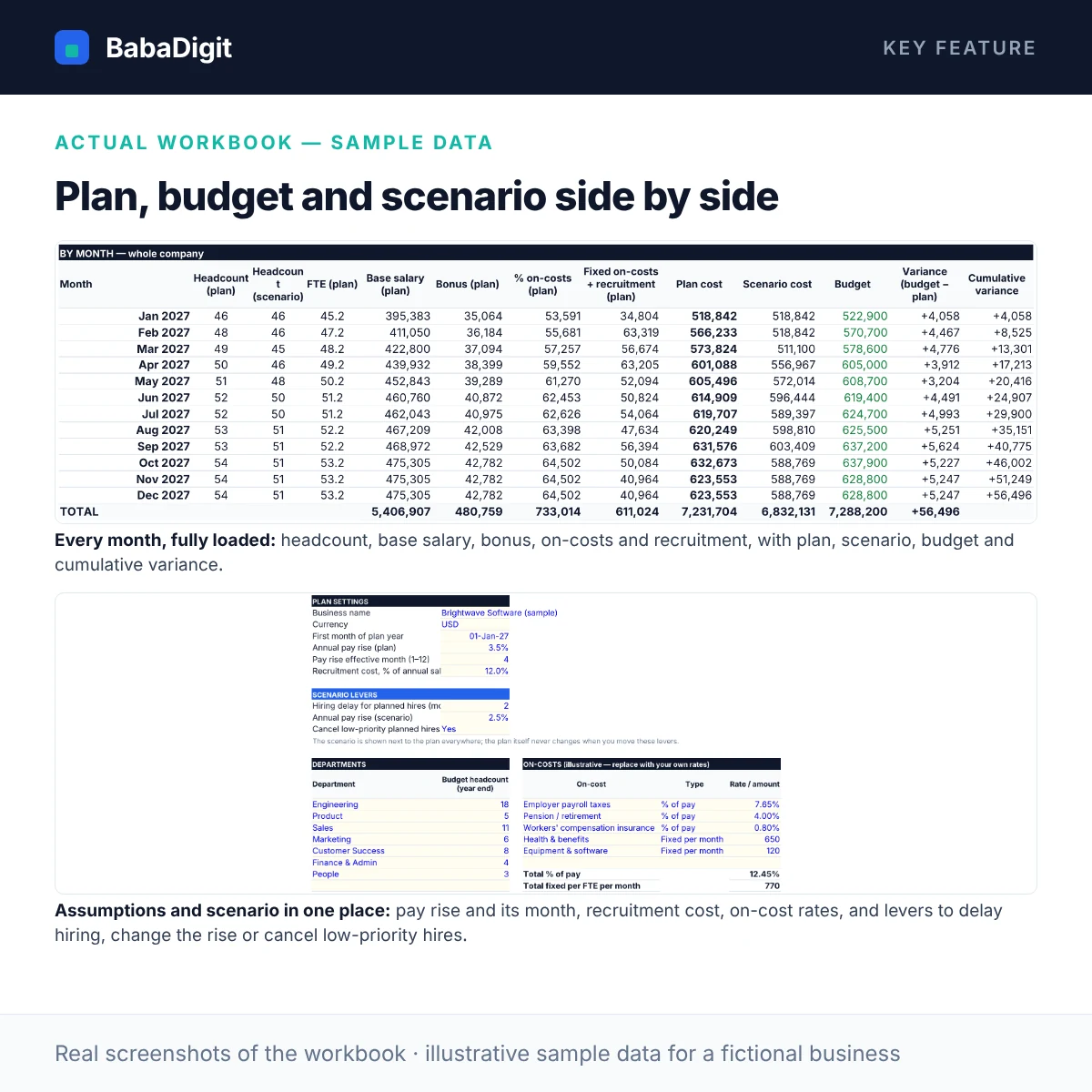
This template builds the plan from the roster up. List current employees, planned hires (with a start date and priority) and known leavers, with salary, FTE and bonus %. It pro-rates every part month, applies the pay rise from its effective month, and adds bonus, percentage on-costs, fixed per-head benefits and recruitment cost — so each month’s cost is fully loaded.
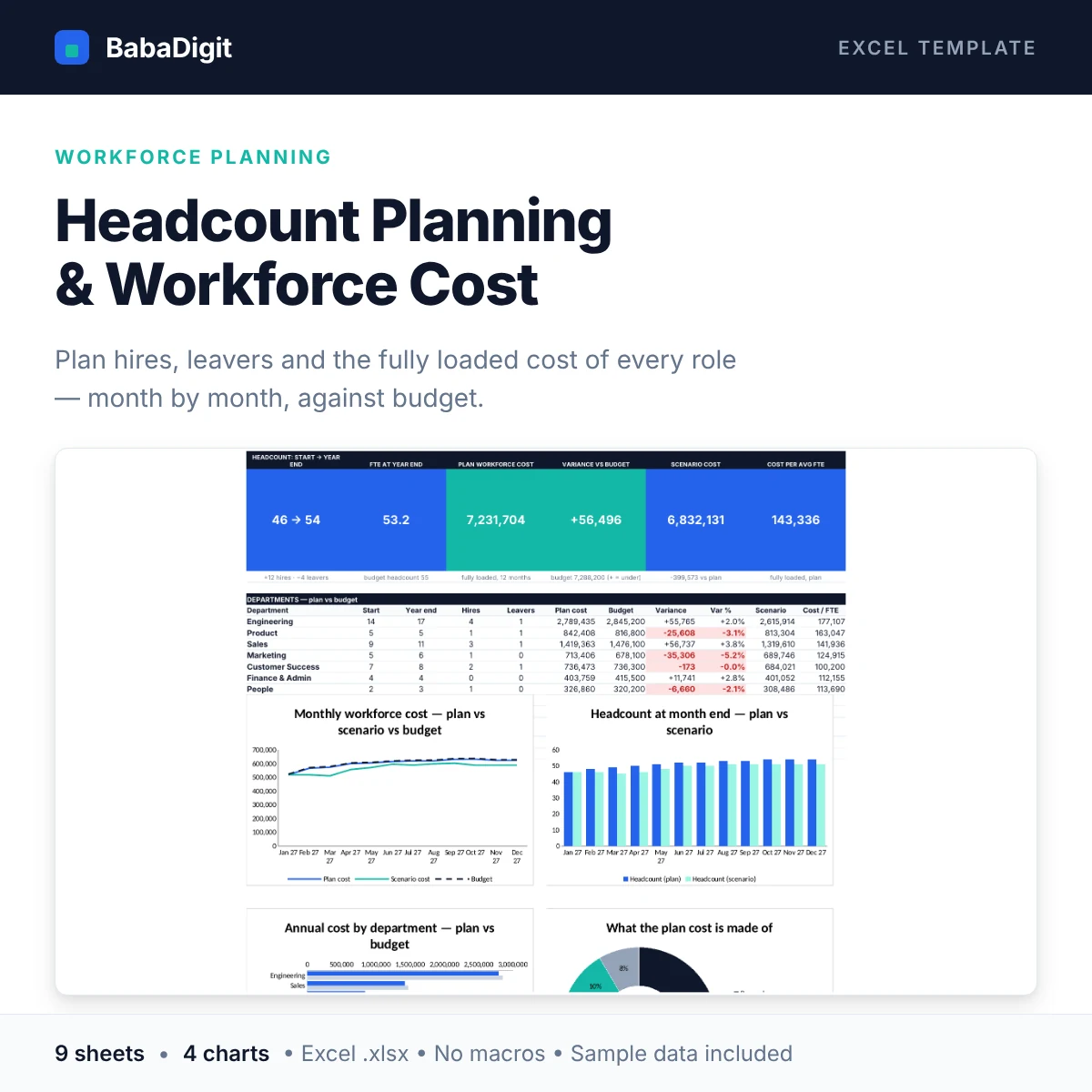
Departments shows headcount at the start and end of the year, hires, leavers, plan cost, budget variance and cost per FTE. A scenario sits beside the plan — delay hiring by a few months, change the pay rise, or cancel low-priority hires — so you can see the saving before you decide.
What you get
- Roster for up to 200 people: current staff, planned hires with priority, and leavers with an end date
- Daily pro-rating of part months and part-time FTE
- Annual pay rise from an effective month, for rise-eligible staff only
- Bonus %, percentage on-costs (payroll taxes, pension…), fixed per-head benefits and recruitment cost
- Budget by department and month, with variance and cumulative variance
- Scenario beside the plan: hiring delay, alternative pay rise, cancel low-priority hires
- Headcount and FTE at every month end, hires and leavers by department
- Dashboard with six KPIs, a department table and four charts: monthly cost vs scenario vs budget, headcount by month, cost by department vs budget, cost composition
- 11 built-in checks (duplicate IDs, unknown departments, date errors, incomplete on-costs, reconciliations) with an overall status
- Macro-free .xlsx with protected formulas and clearly marked input cells
Sheets in the workbook
- Start Here — Purpose, quick start, a live worked example, colour key and navigation.
- Dashboard — Headcount, cost, budget variance, scenario and four charts.
- Setup — Plan year, pay rise, recruitment cost, scenario levers, departments and on-costs.
- Roster — Up to 200 people: current staff, planned hires and leavers, with salary, FTE and bonus.
- Budget — Approved workforce cost by department and month, and budgeted year-end headcount.
- Monthly Cost — Per-person month-by-month FTE, salary and fully loaded cost for the plan and the scenario.
- Departments — Headcount movement, cost, budget variance and cost per FTE by department, plus the monthly totals.
- Checks — Data and reconciliation checks with an overall status.
- Notes & Tests — How each key result is calculated, and test scenarios you can run.
Who it is for
Founders, finance managers, FP&A analysts and HR teams at small and mid-sized companies who build and maintain the annual people budget.
Practical uses
- Building next year’s headcount and salary budget
- Re-forecasting during the year as people join and leave
- Testing a hiring freeze or delay before deciding
- Explaining people cost to investors or the board by department
In the download
- BabaDigit_Headcount_Planning.xlsx — 9 sheets
- README with the full usage guide
- Licence (own business and client use)
- Worked sample data for a fictional software company, clearly labelled
Requirements
- Microsoft Excel 2016 or later, or Microsoft 365
- Also opens in LibreOffice Calc; Google Sheets and Apple Numbers import not yet tested
- No macros, no add-ins, no internet connection required
Please read
- A planning tool, not a payroll system: it does not calculate payslips, statutory deductions or taxes owed.
- On-cost rates in the sample are illustrative placeholders — replace them with your own country’s rates; caps and thresholds are not modelled.
- Bonus is accrued evenly as a % of salary. Salaries are annual gross amounts in one currency.
- This is a tool, not financial, accounting, tax or legal advice.
Reviews
There are no reviews yet.