
Reading this result: 30% off 89.99 saves 27.00, so you pay 62.99.
General information only. Check any figure before you act on it.
Free discount calculator Excel workbook
The same method as the calculator above, in a spreadsheet you can keep, edit and share — with an original-price finder, the seller’s view of a discount and a price list for up to 25 items.
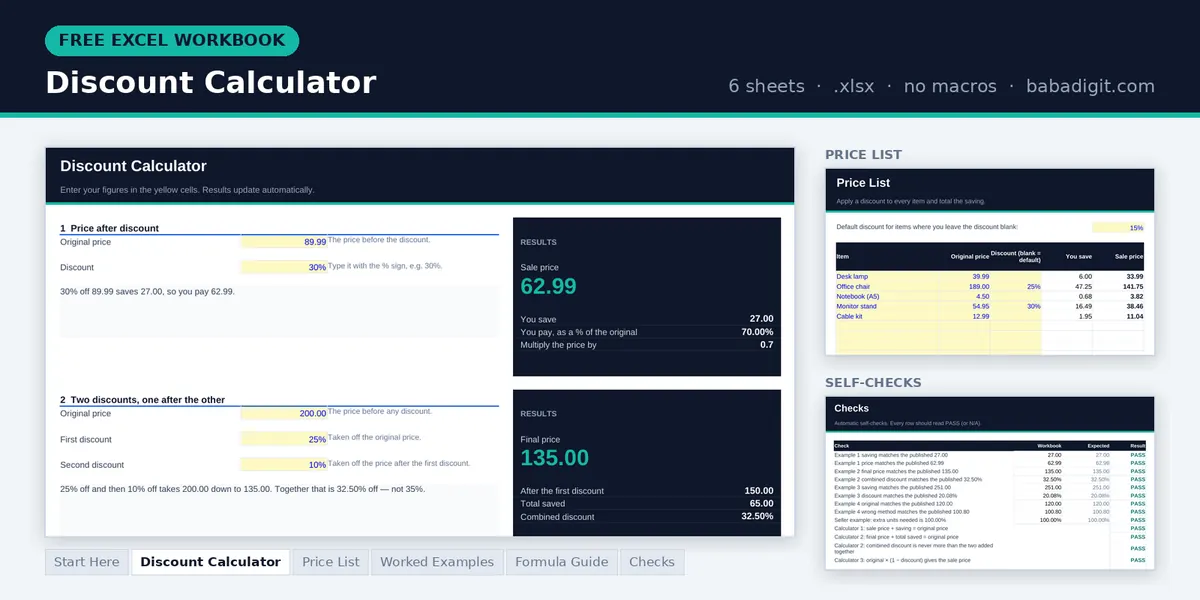
- Discount Calculator — sale price, two discounts combined and % off, plus the original price behind a sale price
- Seller’s view — what a discount does to profit per unit and how many extra sales it needs
- Price List — apply a discount to up to 25 items and total the saving
- Worked examples, formula guide and checks — the four examples from this page, rebuilt, plus built-in self-tests
Opens in Microsoft Excel or LibreOffice Calc. General information only.
Planning a price cut? The Break-Even Analysis Template is a paid spreadsheet for testing how different prices move your break-even point. Browse all templates
How discounts work
A discount is a percentage taken off a price. The saving is that percentage of the original price, and the sale price is what is left. Choose Price after discount to see what you will pay, Two discounts when one reduction is applied on top of another, and % off when you know the old and new prices and want the discount between them.
The saving is rounded to the cent and the sale price is the original price less that rounded saving, so the two always add back to the original exactly — the way they appear on a receipt.
The discount formulas
Saving = Original × d ÷ 100Sale price = Original − Saving = Original × (1 − d ÷ 100)Discount % = (Original − Sale) ÷ Original × 100Two discounts: Final = Original × (1 − d₁) × (1 − d₂)Four worked examples
Price after discount
A jacket at 30% off
A jacket is priced at 89.99 with 30% off.
Pay = 89.99 − 27.00 = 62.99
You pay 62.99 and save 27.00. Multiplying by 0.70 gives the same answer: 89.99 × 0.70 = 62.99.
Two discounts
25% off, then an extra 10%
A 200 item is reduced by 25%, and a coupon takes a further 10% off at the till.
After second = 150 − 15.00 = 135.00
Combined = 1 − 0.75 × 0.90 = 32.50%
The total saving is 65.00, which is 32.50% — not the 35% you get by adding 25 and 10, because the coupon is taken off the lower price.
% off
Was 1,250, now 999
A laptop is reduced from 1,250 to 999.
Discount = 251 ÷ 1,250 × 100 = 20.08%
The reduction is 20.08%. A “nearly 20% off” label would be fair; “25% off” would not.
Original price
Working backwards from a sale price
An item costs 72 after 40% off. What was the original price?
Not: 72 × 1.40 = 100.80
The original price was 120.00. Adding 40% back on to the sale price undershoots, because the 40% was taken from the higher figure.
Stacked discounts are not added together
When a second discount is applied after the first, it is taken from a price that has already been reduced, so it saves less than it would on its own. The combined discount is always smaller than the two percentages added up — multiply what you pay at each step instead.
| Discounts | Added up | Actual combined discount | You pay |
|---|---|---|---|
| 10% then 10% | 20% | 19.00% | 81.00% |
| 20% then 10% | 30% | 28.00% | 72.00% |
| 30% then 20% | 50% | 44.00% | 56.00% |
| 25% then 25% | 50% | 43.75% | 56.25% |
| 50% then 50% | 100% | 75.00% | 25.00% |
The order does not matter: 30% then 20% gives the same final price as 20% then 30%.
Discounts from the seller’s side
For a shopper a discount is a saving. For a seller it comes straight out of the profit on every unit. Take an item that sells for 100 and costs 60: the gross profit is 40, a 40% margin. At 20% off the price is 80 and the profit is 20 — half what it was. To earn the same gross profit the seller now has to sell twice as many.
Before you run a promotion, check the margin you will be left with on the Gross Margin Calculator, and how many extra units the lower price needs on the Break-Even Calculator.
Do it in a spreadsheet
With the original price in A1 and the discount as a number in B1 (for example 30):
- Saving:
=ROUND(A1*B1/100,2) - Sale price:
=A1-ROUND(A1*B1/100,2) - Discount from a sale price in C1:
=(A1-C1)/A1, formatted as a percentage. - Original price from a sale price in C1:
=C1/(1-B1/100)
Frequently asked questions
How do I calculate a discount?
Multiply the original price by the discount percentage and divide by 100 to get the saving, then subtract it from the price. 30% off 89.99 saves 89.99 × 30 ÷ 100 = 27.00, so you pay 62.99. Or multiply the price by one minus the discount: 89.99 × 0.70 = 62.99.
How do I work out the percentage off?
Subtract the sale price from the original price, divide by the original price and multiply by 100. A price cut from 1,250 to 999 saves 251, which is 251 ÷ 1,250 × 100 = 20.08% off.
Are two discounts the same as adding them together?
No. The second discount is taken from the already-reduced price, so it saves less. 25% off and then a further 10% off is 32.5% off in total, not 35%. Multiply the two “you pay” fractions: 0.75 × 0.90 = 0.675, which is 67.5% of the original price.
How do I find the original price before a discount?
Divide the sale price by one minus the discount as a decimal. A sale price of 72 after 40% off was 72 ÷ 0.60 = 120 originally. Adding 40% back on to 72 gives 100.80, which is wrong.
Is tax charged before or after a discount?
In most VAT and sales-tax systems the tax is worked out on the price actually charged, so after the discount. Rules for coupons, vouchers and rebates differ between countries, so check the local rules. The VAT Calculator can add the tax once you know the discounted price.
Does a discount always mean the seller loses money?
Not necessarily, but it always cuts the profit on each sale by the full amount of the discount. A 20% discount on a product with a 40% gross margin halves the profit per item, so the seller has to sell twice as many just to earn the same gross profit.
Keep going
Written and reviewed by Ghayas Uddin, MS (Finance), financial analyst. Last reviewed 4 October 2026. Found an error? Email support@babadigit.com and we will correct it.