
Reading this result: enter the VAT rate that applies to this sale — this calculator does not assume one.
General information only, not tax advice. Check any figure before you act on it.
Free VAT calculator Excel workbook
The same method as the calculator above, in a spreadsheet you can keep, edit and share — with the multipliers for your rate and a per-line vs per-invoice rounding check for up to 20 invoice lines.
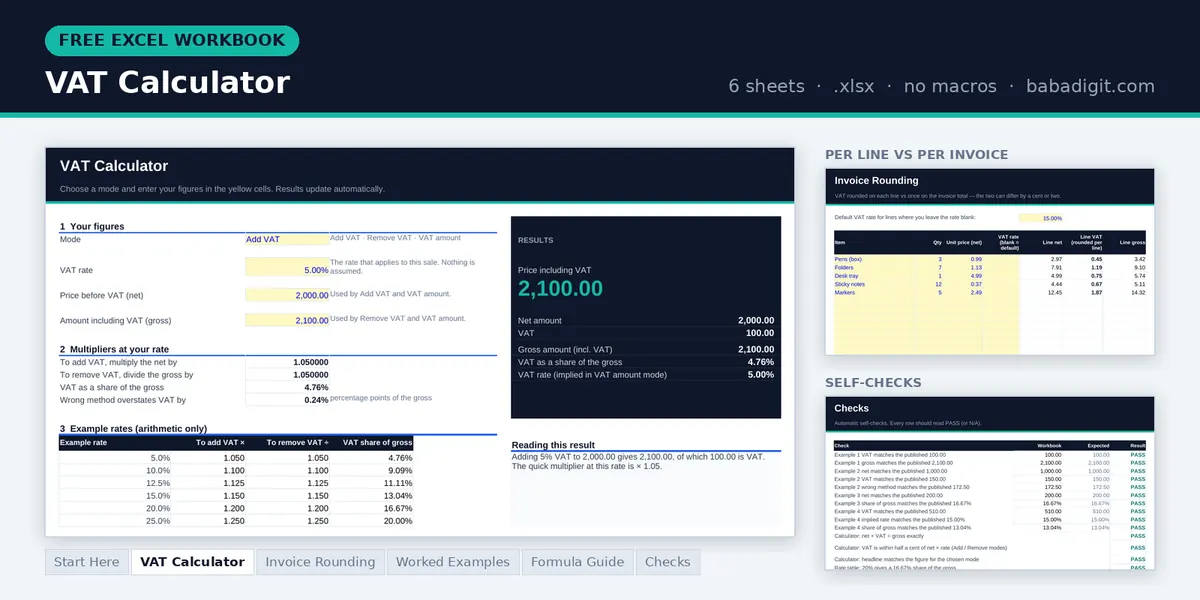
- VAT Calculator — add VAT, remove VAT or find the rate on an invoice, plus the multipliers for your rate
- Invoice Rounding — VAT rounded on each line vs once on the total, for up to 20 lines, and the difference
- Worked examples — the four examples from this page, rebuilt
- Formula guide and checks — the maths in plain English, plus built-in self-tests
Opens in Microsoft Excel or LibreOffice Calc. General information only, not tax advice.
Issuing invoices with VAT? The Professional Invoice Template is a paid spreadsheet for producing clean, consistent invoices. Browse all templates
How VAT is added and removed
Value added tax is charged as a percentage of the price before tax — the net amount. Add the tax and you get the gross amount, the figure the customer actually pays. Almost every VAT calculation is one of three questions: what does this cost once VAT is added, how much of this total is VAT, and what rate has this invoice charged?
The calculator above answers all three. Choose Add VAT when you start from a net price, Remove VAT when you start from a VAT-inclusive total, and VAT amount when you already know both figures and want the VAT and the rate between them. You enter the rate yourself, so it works for any rate — standard, reduced or zero — and for similar taxes such as GST.
The three VAT formulas
Add VAT: Gross = Net × (1 + rate ÷ 100)Remove VAT: Net = Gross ÷ (1 + rate ÷ 100)VAT amount: VAT = Gross − NetImplied rate = VAT ÷ Net × 100The calculator rounds the VAT to two decimal places and derives the other figure from it, so net plus VAT always equals gross exactly — the way the figures have to appear on an invoice. Amounts you type are rounded to two decimal places first.
Four worked examples
The rates below are examples chosen to make the arithmetic easy to follow. They are not the rate of any particular country.
Adding VAT
Pricing a service
A consultant quotes 2,000 before VAT. Example rate: 5%.
Gross = 2,000 + 100 = 2,100.00
Shortcut: 2,000 × 1.05 = 2,100.00
The client pays 2,100.00. The consultant keeps 2,000.00 and passes the 100.00 on to the tax authority.
Removing VAT
Splitting a VAT-inclusive total
A receipt shows 1,150 including VAT. Example rate: 15%.
VAT = 1,150 − 1,000 = 150.00
Not: 1,150 × 15% = 172.50 (22.50 too much)
The VAT inside the total is 150.00. Taking 15% of the total would overstate it, because the 15% was charged on 1,000, not on 1,150.
Removing VAT
Why the share of the total is smaller than the rate
A price of 240 includes VAT. Example rate: 20%.
VAT = 240 − 200 = 40.00
VAT ÷ gross = 40 ÷ 240 = 16.67%
At a 20% rate, VAT is always one-sixth (16.67%) of a VAT-inclusive price. That fraction — rate ÷ (100 + rate) — is shown in the calculator as the share of the gross.
Checking an invoice
Working out which rate was charged
A supplier invoice shows 3,400 net and 3,910 total.
Rate = 510 ÷ 3,400 × 100 = 15.00%
Share of gross = 510 ÷ 3,910 = 13.04%
The invoice charges 15% on the net amount. If that is not the rate you expected for this supply, query it before you pay or reclaim it.
The most common mistake: taking the rate off the total
If a price already includes VAT, multiplying it by the VAT rate does not give you the VAT. The rate was applied to the net amount, so the VAT is a smaller share of the gross than the headline rate suggests. Dividing by (1 + rate) is the only correct way to take VAT out.
The size of the error grows with the rate. At 5% the overstatement is small; at 20% or more it is large enough to matter on every invoice, in a VAT return, and in any price you set by working backwards from a round figure.
| Example rate | To add VAT | To remove VAT | VAT as a share of the gross |
|---|---|---|---|
| 5% | × 1.05 | ÷ 1.05 | 4.76% |
| 10% | × 1.1 | ÷ 1.1 | 9.09% |
| 12.5% | × 1.125 | ÷ 1.125 | 11.11% |
| 15% | × 1.15 | ÷ 1.15 | 13.04% |
| 20% | × 1.2 | ÷ 1.2 | 16.67% |
| 25% | × 1.25 | ÷ 1.25 | 20.00% |
Example rates only — they are not the rate of any particular country. Check the rate that applies to your sale with your tax authority.
Rounding: per line or per invoice
When an invoice has several lines, VAT can be rounded on each line and then added up, or worked out once on the invoice total. The two methods can differ by a cent or two. Both are used in practice, and the rules on which one is acceptable depend on the jurisdiction and sometimes on the type of business.
Whichever method you use, apply it consistently, and make sure the VAT total on the invoice equals the figure that goes into your records. The free workbook on this page shows both methods side by side for up to 20 invoice lines, so you can see the difference before you issue the invoice.
Before you rely on the figure
This calculator does the arithmetic. Deciding which rate applies is a separate question, and it is where most real VAT errors come from.
- Standard, reduced and zero rates. Many countries charge different rates on different goods and services. A zero rate still counts as a VAT rate: the sale is taxable, just at 0%.
- Exempt supplies. An exempt sale carries no VAT at all, and it can affect how much VAT the seller is allowed to reclaim. Exempt and zero-rated are not the same thing.
- Registration. A business normally charges VAT only if it is registered for it. Being below a registration threshold, where one exists, usually means no VAT is charged.
- Rates change. Governments adjust VAT rates, sometimes at short notice. Check the current rate with the official tax authority for the place of supply rather than relying on a list you found online.
Do it in a spreadsheet
With the net amount in A1, the rate as a percentage in B1 (for example 15), and a VAT-inclusive total in C1:
- Add VAT:
=ROUND(A1*B1/100,2)for the VAT, then=A1+ROUND(A1*B1/100,2)for the gross. - Remove VAT:
=ROUND(C1/(1+B1/100),2)for the net, then=C1-ROUND(C1/(1+B1/100),2)for the VAT. - Implied rate from a net (A1) and a gross (C1):
=(C1-A1)/A1, formatted as a percentage.
Frequently asked questions
How do I add VAT to a price?
Multiply the net price by one plus the rate as a decimal. At a 15% example rate, 200 × 1.15 = 230.00, of which 30.00 is VAT. To see the VAT on its own, multiply the net price by the rate: 200 × 0.15 = 30.00.
How do I remove VAT from a total?
Divide the VAT-inclusive total by one plus the rate as a decimal. At a 20% example rate, 600 ÷ 1.20 = 500.00 net, so the VAT is 100.00. Do not multiply the total by 20% — that gives 120.00, which is wrong.
Why isn’t the VAT equal to the rate multiplied by the total?
Because the rate is charged on the net price, not on the total. The VAT is therefore a smaller share of the total than the rate: rate ÷ (100 + rate). At a 20% rate that is 16.67% of the total; at 10% it is 9.09%.
What VAT rate should I use?
The rate that applies to your particular sale in the place where it is taxed. It can depend on the country, the type of goods or service and the customer. This calculator deliberately does not assume a rate — check the current rate with the official tax authority.
What is the difference between zero-rated and exempt?
A zero-rated sale is taxable at 0%, so no VAT is added but it is still part of the VAT system. An exempt sale is outside the charge altogether, which can restrict how much VAT the seller may reclaim on its own costs. For the calculator, both mean the VAT on that sale is zero.
Should VAT be rounded per line or per invoice?
Both methods are used, and they can differ by a cent or two on a multi-line invoice. Which is acceptable depends on local rules. Pick one, apply it consistently, and make sure the invoice VAT total matches your records.
Does this work for GST or sales tax?
The arithmetic is the same for any tax charged as a percentage on top of a net price, including GST. Sales taxes that are added only at the final sale, or that combine several local rates, follow the same formulas once you know the combined rate.
References
- OECD. International VAT/GST Guidelines, OECD Publishing, Paris, 2017 — on the design of value added taxes and the destination principle.
- OECD. Consumption Tax Trends, OECD Publishing, Paris (published every two years) — for VAT/GST rates and structures by country.
- Council Directive 2006/112/EC of 28 November 2006 on the common system of value added tax, Official Journal of the European Union — the framework for VAT in EU member states.
Keep going
Published by BabaDigit. Last updated 30 September 2026. Found an error? Email support@babadigit.com and we will correct it.