
 Download the Personal Expense Tracker (.xlsx)
Designed and tested for Microsoft Excel. Opens with clearly labelled sample data you can clear. General information only, not financial advice.
What’s inside
- Setup — currency, the year you are tracking and up to 20 household categories you can rename.
- Expenses — room for 500 purchases: date, description, category (dropdown) and amount.
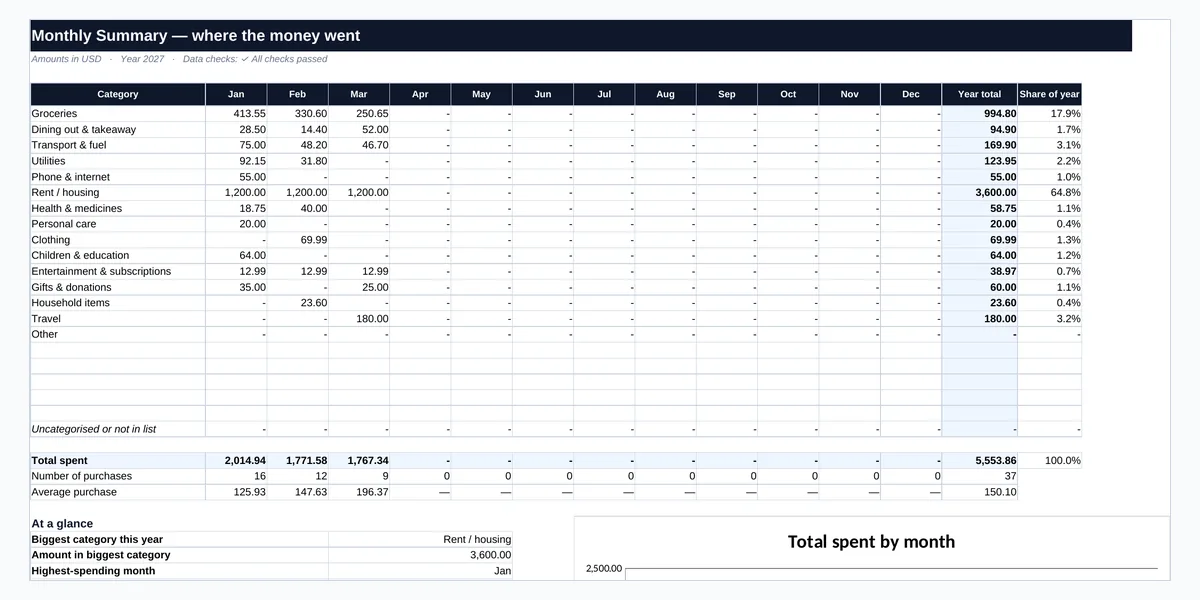
- Monthly Summary — each category by month, year totals, each category’s share, the number of purchases and the average purchase, plus your biggest category and highest-spending month.
- Checks — 12 checks, such as invalid dates, text amounts and purchases without a category.
Purchases without a category appear as “Uncategorised” so no money goes missing from the totals. It is a personal and household tracker, not a business expense-management system.
How to use it
- Set up your categories. Keep the defaults or rename them to match your household.
- Log each purchase. Add the date, a short description, the category and the amount — daily or weekly from receipts or your bank app.
- Review each month. The Monthly Summary shows your totals and the categories that take the biggest share.
- Compare with your budget. Copy the monthly category totals into the free Personal Budget Planner to see budget vs actual.
Example
The sample household logs 37 purchases from January to March:
Total spent 5,553.86
Rent / housing 3,600.00 (64.8%)
Groceries 994.80 (17.9%)
Average purchase 150.10
Seeing groceries as the second-largest share is often the starting point for a realistic budget.
Frequently asked questions
How is this different from the Personal Budget Planner?
The tracker records each individual purchase. The budget planner works with monthly totals and compares them with your plan. Use the tracker to collect the numbers and the planner to compare them with your budget.
Can I change the categories?
Yes. Edit the list on the Setup sheet (up to 20). Purchases logged under a removed category are shown as Uncategorised until you re-assign them.
How do I record a refund?
Reduce the original purchase amount, or enter the net amount. Negative amounts are flagged by the Checks sheet.
Can I use it for more than one year?
Use one file per year. Purchases dated in other years are not counted in the summary, and the Checks sheet tells you how many there are.
Does it work in Google Sheets?
The workbook is designed and tested primarily for Microsoft Excel. It can be opened in other spreadsheet applications, but some features may behave differently.
Tracking spending for a business rather than a household? The paid Business Expense Tracker Template adds payment methods, departments and budget comparison.
Related free resources
This workbook is a personal tracking tool, not financial advice. Written and reviewed by Ghayas Uddin, MS (Finance), financial analyst. Last reviewed 5 October 2026. Found an error? Email support@babadigit.com.