

Most jobs that lose money don’t lose it at the end — the overrun builds quietly in the middle, while the invoices for labour, materials and subcontractors are still arriving. By the time the job closes, the margin has gone.
This template tracks every job against its estimate as it runs. Enter the estimated cost by cost code, record change orders (approved ones update the contract and budget; pending ones are shown separately) and post actual costs from invoices and timesheets. With your % complete, it calculates earned value, cost variance, an estimate at completion by one of two standard methods, and the projected profit and margin.
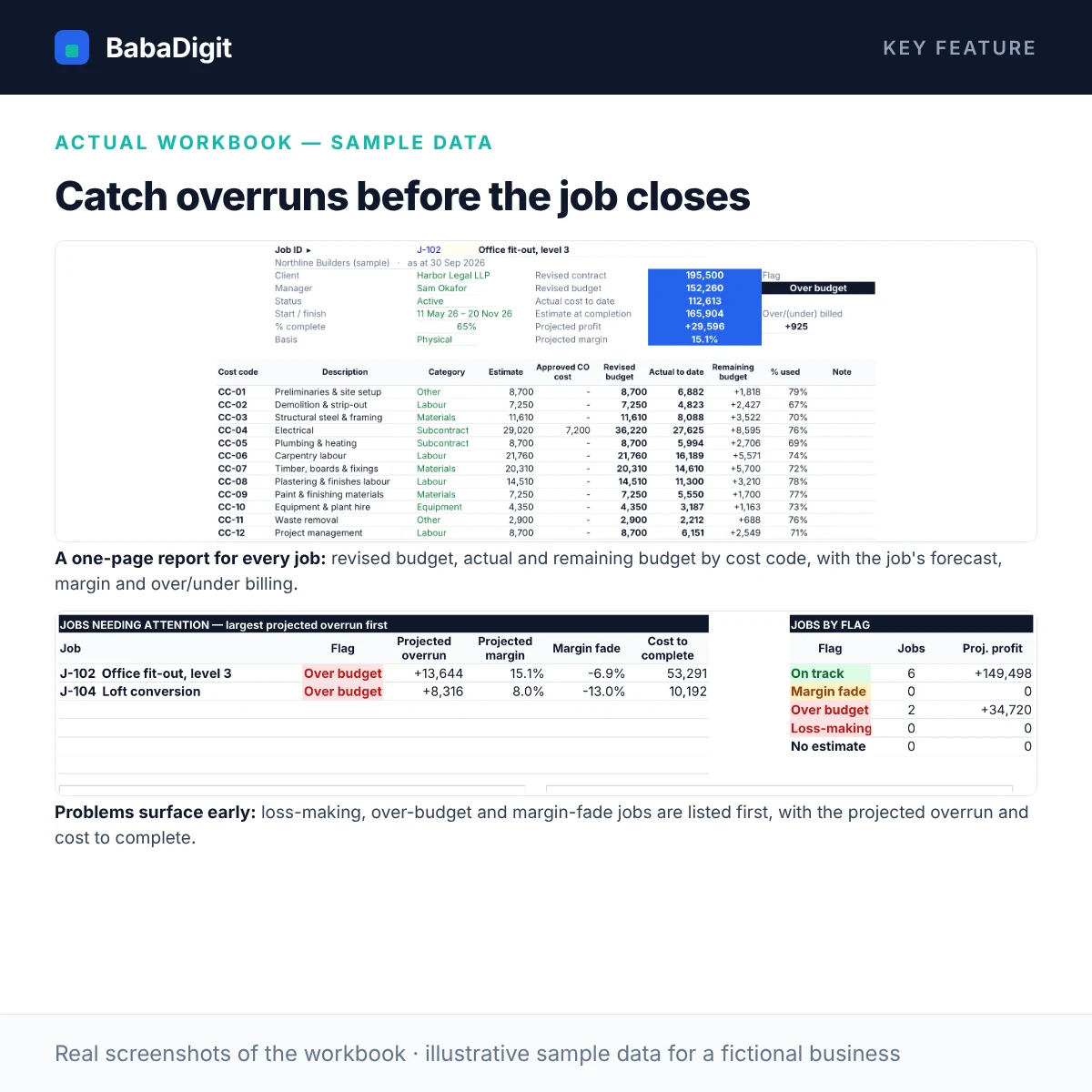
Job Analysis puts every job on one line — revised contract, revised budget, actual, forecast, margin fade and over/under billing — and flags jobs that are loss-making, over budget or fading. The Dashboard shows the portfolio, and Job Report prints a cost-code breakdown for any job.
What you get
- Estimate by cost code for up to 60 jobs (600 estimate lines, 20 cost codes in your own categories)
- Change orders with Approved / Pending / Rejected status: approved ones update the revised contract and budget
- Actual cost log for up to 2,000 postings, with an as-at date so late-dated costs are excluded and flagged
- % complete from physical progress or cost-to-cost, earned value, cost variance and CPI
- Estimate at completion by ‘budget remaining’ or ‘cost performance’, projected overrun, profit and margin
- Margin fade vs the original estimate, and over/under billing (a WIP schedule) from billed to date
- Automatic flags: loss-making, over budget, margin fade, on track — with your own thresholds
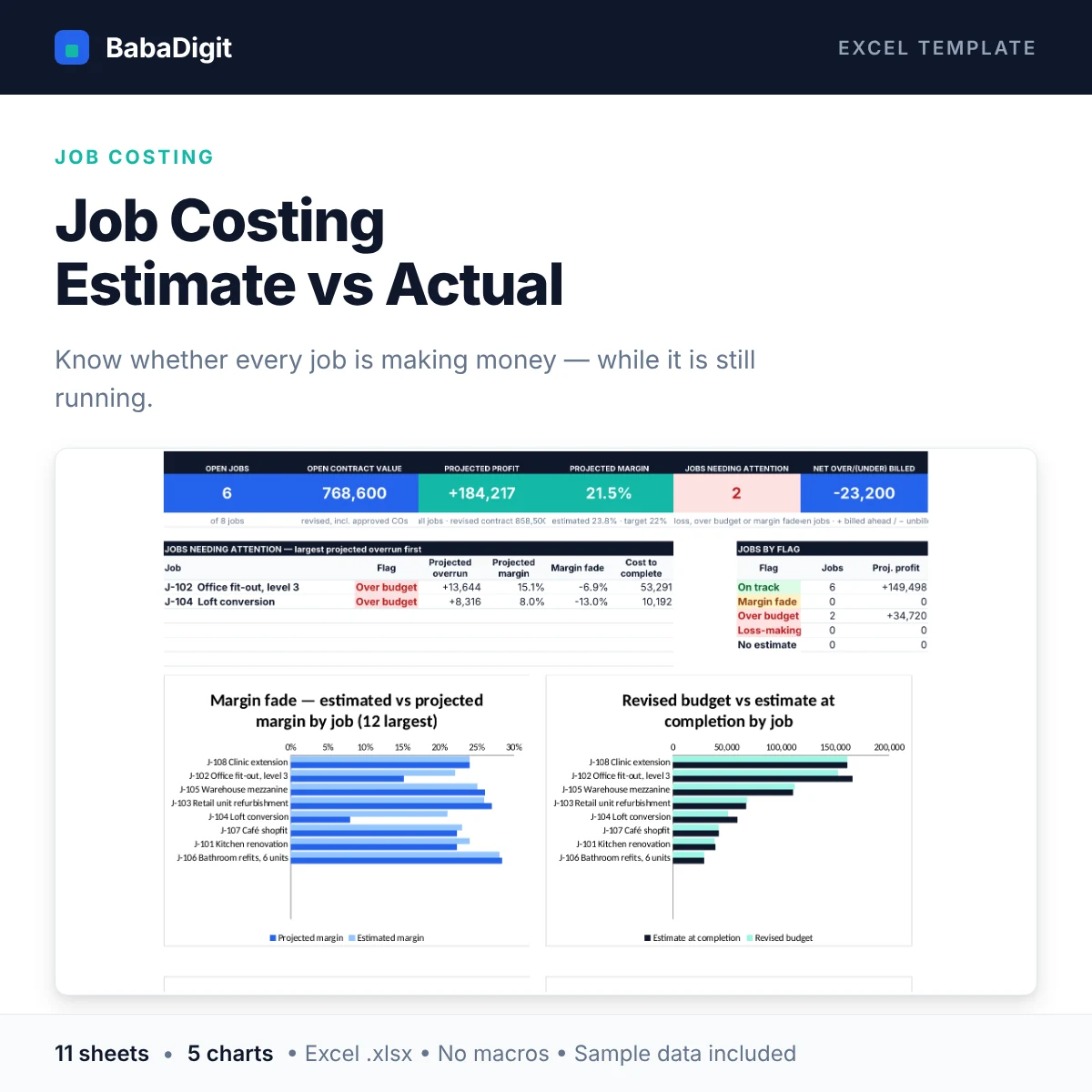
- Dashboard with six KPIs, a jobs-needing-attention list and four charts: margin fade by job, budget vs EAC by job, budget vs actual by cost category, monthly cost trend
- Printable Job Report for any job, with a budget-vs-actual chart by cost code
- 11 built-in checks (unknown jobs/codes, unbudgeted costs, out-of-range progress, two reconciliations) and a macro-free .xlsx
Sheets in the workbook
- Start Here — Purpose, quick start, a live worked example, colour key and navigation.
- Dashboard — Open jobs, projected profit and margin, jobs needing attention, over/under billing and four charts.
- Setup — As-at date, forecast method, thresholds, cost codes and categories.
- Jobs — Up to 60 jobs: client, status, contract value, % complete, billed to date.
- Estimates — Up to 600 estimate lines: estimated cost by job and cost code.
- Change Orders — Up to 200 variations with revenue, cost and approval status.
- Actual Costs — Up to 2,000 cost postings by date, job and cost code.
- Job Analysis — Revised contract and budget, actual, % complete, cost at completion, projected profit, margin fade and WIP per job.
- Job Report — Printable cost-code report and chart for any job you pick.
- Checks — Data and reconciliation checks with an overall status.
- Notes & Tests — How each key result is calculated, and test scenarios you can run.
Who it is for
Builders, contractors, trades, fit-out and renovation firms, installers, agencies and workshops who price work as jobs.
Practical uses
- Monthly job-cost review and WIP schedule
- Spotting overruns and margin fade before a job closes
- Tracking change orders and what is still pending
- Giving each project manager a one-page job report
In the download
- BabaDigit_Job_Costing.xlsx — 11 sheets
- README with the full usage guide
- Licence (own business and client use)
- Worked sample data for a fictional building contractor, clearly labelled
Requirements
- Microsoft Excel 2016 or later, or Microsoft 365
- Also opens in LibreOffice Calc; Google Sheets and Apple Numbers import not yet tested
- No macros, no add-ins, no internet connection required
Please read
- A job-costing and forecasting tool, not an accounting system: it does not post to a ledger, pay suppliers or invoice clients.
- Forecasts depend on the % complete you enter; leave it blank to use cost-based progress.
- Revenue earned and over/under billing are management estimates (percentage of completion), not a substitute for your accountant’s revenue-recognition treatment.
- Amounts are entered net of recoverable sales tax/VAT. One currency per file.
- This is a tool, not financial, accounting, tax or legal advice.
Reviews
There are no reviews yet.